
The Virtual Hub is a clinical support service established to assist patients and providers throughout UHealth. Our team of Licensed Practical Nurses (LPNs) provide technical support to the patient, complete clinical intake, and connect the patient and provider in a seamless and timely manner.
Technical Support Capabilities include, but are not limited to:
- MyChart: activation, password issues, navigation, Proxy assignment
- Zoom troubleshooting (i.e., mic is not working)
Our staff are able to assist from 7:30 am to 5:00 pm, Monday through Friday. Outside of these times, please leave a message and someone in our staff with return your call. You can also email our team at telehealth@miami.edu.
Quick Links
For help with appointments, including but not limited to:
- Make, change, or cancel your appointment
- Connect with your doctor’s office
- Change your demographic information
- Request medical records
- Request prescriptions
Please call 305-243-4000, option 1
For assistance with MyChart issues: Call the MyChart Help Desk at 877-448-1773 or click here to access your MyUHealthChart account.
To find a UHealth doctor: Please use the Find a Doctor directory. You will be able to search for a provider by their first or last name, by condition or specialty.
FAQs
- Clinic staff might sign you up directly while you're at the front desk or in the exam room.
- You might receive a MyChart activation code on your After Visit Summary.
- You might receive a text or email with an activation code when you come in for a visit, or before a TeleHealth visit.
- You might be able to use self-signup online to create a MyChart account by matching your information against what is on file in your medical record or with third-party identity verification.
- On the MyChart login screen on the MyChart website or mobile app, click Sign Up Now.
- Click Sign Up Online.
- Click Match Yourself with Our Records or Verify with a Third Party to supply personal verification items, such as the last four digits of your Social Security number and your date of birth, and have an activation code sent to your email address or mobile phone.
- From the MyChart login screen on the MyChart website or MyChart mobile app, select Sign Up Now.
- Enter your activation code and other personal verification items, such as the last four digits of your Social Security number and your date of birth. Select Next.
- On the next page, choose the following:
- MyChart username. Choose something that others wouldn't be likely to guess but is easy for you to remember. It cannot be changed at any time.
- Password. Choose a unique combination of numbers and letters, using both uppercase and lowercase letters. Your password must be different from your MyChart username. Choose a password that you don't use for other websites.
- Security question. Choose a question you can use to verify your identity if you forget your MyChart password. The answer you enter cannot include your MyChart password.
- On the next screen, choose whether you want to receive a notification message in your personal email when there is new information available in your MyChart account. If you opt to receive email alerts, enter your email address.
- Go to Account Settings > Personal Information.
- In the Details About Me section, click Edit.
- Select your race, ethnicity, and language from the lists of options.
- Click Save changes.
- Go to Account Settings > Communication Preferences.
- Under Details, expand the Health section.
- Select Advanced settings.
- Under Test Result, toggle the slider next to the communication option you prefer. When it's green with a check mark, the communication type is enabled.
- Click Save Changes.
- Go to Communication > Messages.
- Select Send a message.
- Select Ask a medical question. Review any disclaimers that appear and select Next.
- Select the topic that best matches your medical question.
- Select the recipient for the question.
- Enter a Subject for the message and type your question in the text box below.
- When you are finished, click Send.
- If you'll join the video visit on your mobile device, make sure the camera app is up-to-date.
- If you'll join the video visit on your desktop computer:
- Make sure you have a webcam set up. This can be a webcam that's part of a laptop or a separate USB webcam.
- Make sure you've installed any required browser plug-ins, software, or apps with the most recent updates.
- The standard range for the result
- Any additional comments your provider entered about the result
- At the top of the home page are shortcuts you can use to get to the most commonly used activities.
- You can customize the shortcuts by selecting your account in the top right corner and then Change Your Shortcuts.
- Below the shortcuts is the health feed, which shows the most important alerts and information for you and any family member you care for, like a new message from your care team and reminders for an upcoming appointment.
- You can use the searchable menu to easily find any other activities you need to get to.
- Specify the color scheme.
- Change the name that appears under that person's photo.
- Add or change the photo. Note that photos you upload through MyChart are visible to medical staff, so you should only use a photo that shows each person's face.
- Go to Account Settings > Personalize.
- Click Edit.
- Make any of the changes described above and then click Save.
- Open generally available questionnaires from My Record > Questionnaires.
- If your doctor wants you to complete a questionnaire for an upcoming appointment, go to My Record > Visits. Locate the upcoming appointment and click Details. Open the questionnaire by clicking its name in the Questionnaires section of the appointment details.
- If your doctor sends you a MyChart message with an attached questionnaire, open it by clicking the questionnaire link near the top of the message.
How to sign up
There are different ways to sign up for a MyChart account. To sign up for MyChart, you must be at least 18 years old. There are several different methods of MyChart signup that might be used by different departments across the organization:
How to get a new link
If you don't have an activation code, you can request one online. To request an activation code online:
How to create an account
How to change email/user id/password
If you're having trouble logging in, click the Forgot Username? or Forgot Password? link below the login fields for assistance. You will be prompted to answer some security questions to verify your identity so you can recover your username or password. If you fail to recover your password after 5 unsuccessful attempts, you will be directed to reset your password. If you have 5 unsuccessful attempts at resetting your password, your account will be deactivated and you'll need to contact Customer Service.
How to navigate MyChart
(WILL ADD VIDEO LINKS HERE)How to change the language
If you would like to receive emails or text messages when new results are available:
How to upload a record
Lorem ipsum
How to write to your doctor
If you have a non-urgent medical question, you can send a message to care team. This message is secure, meaning your information stays private as it is sent over the Internet.
You might send a message if you're not sure whether you should come in for an appointment, if you need clarification on the dosage of one of your medications or something that was discussed in a recent visit, or if you just want advice about a common illness.
If you've opted to receive notification for new messages in your MyChart account, you'll receive a message or push notification letting you know that the clinic has responded to your request.
How to join a video visit
Prepare for your video visit
To ensure a smooth connection, complete the following tasks well in advance of your video visit:
After you've done these things, you can test that everything is working in MyChart. You should complete this test at least 30 minutes prior to your video visit start time.
How to see test results
With MyChart, you can view test results as soon as they become available, rather than waiting for a phone call or letter from your physician. To view test results, go to My Record > Test Results. Select a test to see more information about it, such as:
How to create shortcut buttons
When you first log in to MyChart, you'll see the MyChart home page.
How to add/upload your photo (phone and computer)
There are three ways you can personalize how MyChart appears for you and each of your family members. For each account you have access to, you can:
Questionnaires
Your clinic might make questionnaires available from MyChart so you can complete them online instead of filling out a form when you get to the clinic.
You might be able to respond to questionnaires in three different places:
If you need to close a questionnaire before you finish it, click Finish Later to save your progress.
Zoom is the platform being used to conduct Telehealth visits at the University of Miami.
For assistance with Zoom, please see below:
How to download
Patients will need to download the MyChart app (App Store / Google Play) as well as the Zoom app (App Store / Google Play).
Please Note: A Zoom account does NOT need to be created.
On a Computer - Patient can log on to myuhealthchart.com to access appointments
How/when to connect
15 minutes prior to your appointment time, log into the MyUHealthChart app. Find your appointment and click on the green button “video visit”.
The Zoom Welcome screen will appear (left). Once the provider joins the session you will see yourself and your provider on the screen (right).
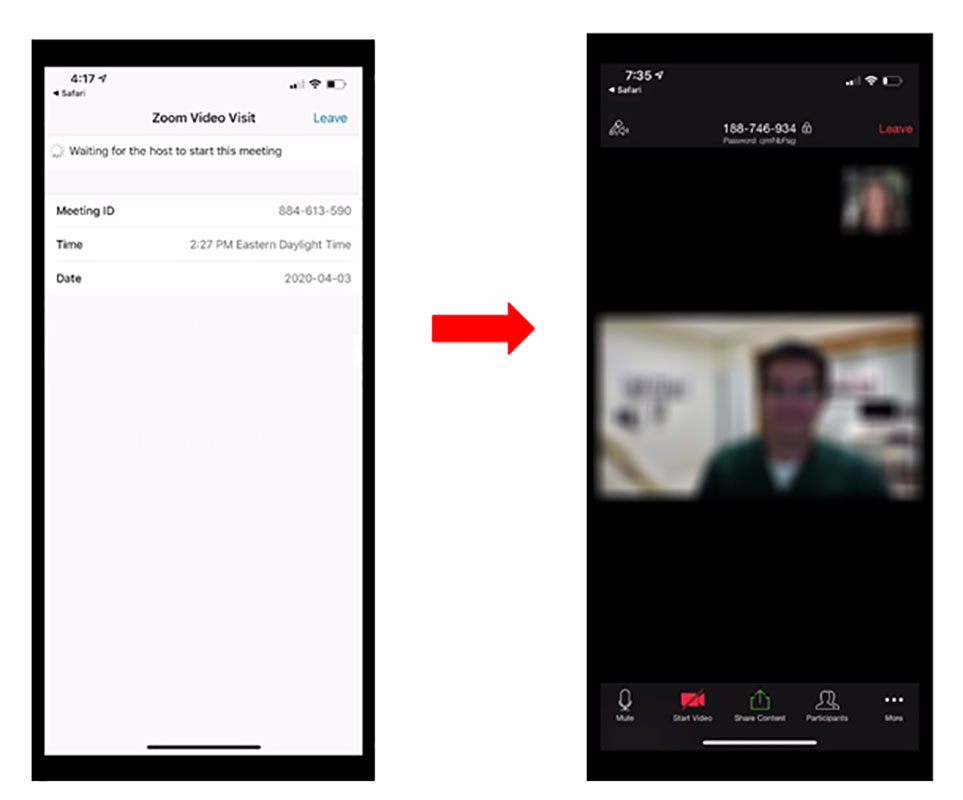
When you are taken into a session, you may be prompted to allow access to your webcam and microphone. If you do not see the prompt or a video preview of yourself, call the technical support line for assistance or contact your Provider’s office.
Telephone: 1-877-448-1773 (toll free in US/Canada) or 1-248-823-0638
Audio/video issues (settings)
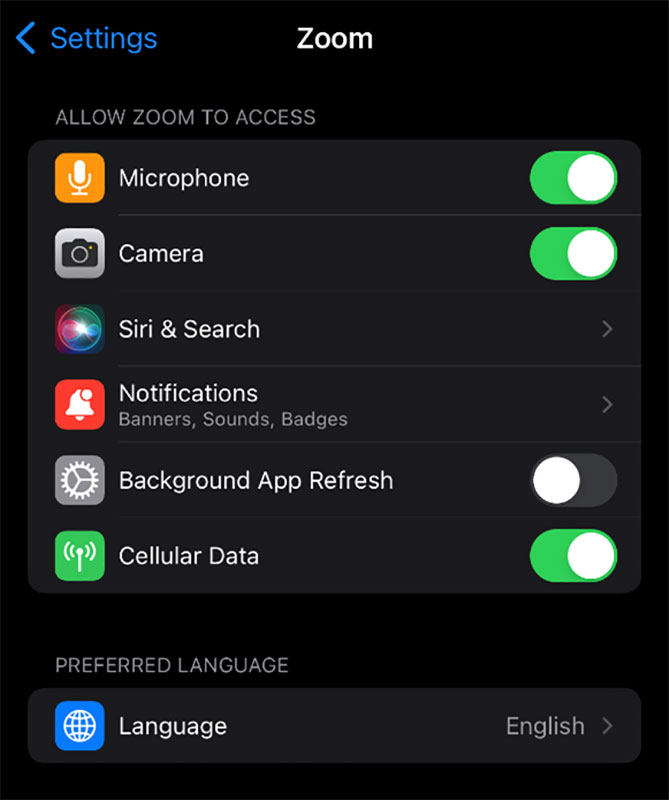
If the zoom application is not allowing you to unmute the microphone, or turn on your camera, go to the settings application on your phone. Once there, select the Zoom application, and Allow Zoom to access your microphone and camera.
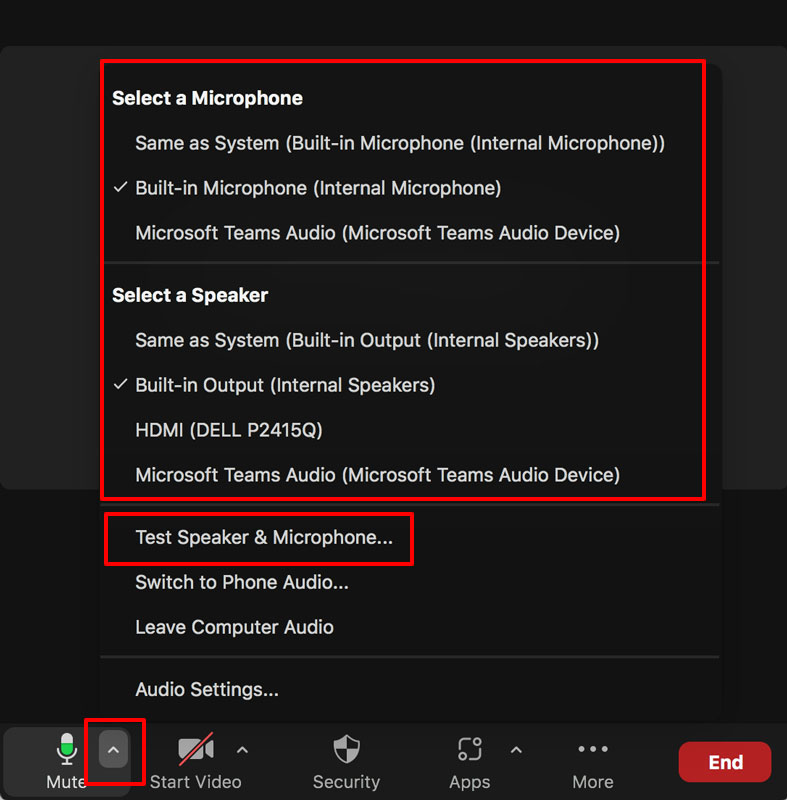
If you need to change the microphone or headset, select the ^ next to the microphone within the Zoom application, and change. If you do not know the correct ones to select, select ‘Test Speaker & Microphone’.
Doximity is a backup application that is being used at the University of Miami. This allows the provider to send a text message that can then be a video visit with the patient. Please see below for assistance with Doximity.
How to accept call
For a Doximity visit, a physician can send a secure message, or create a ‘Video Call’ for the patient. Once this is created, the patient will receive a text message that alerts the patient that it is time for the video call.
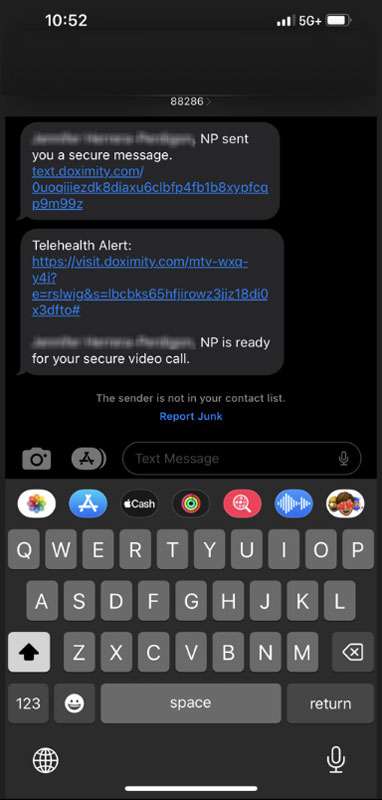
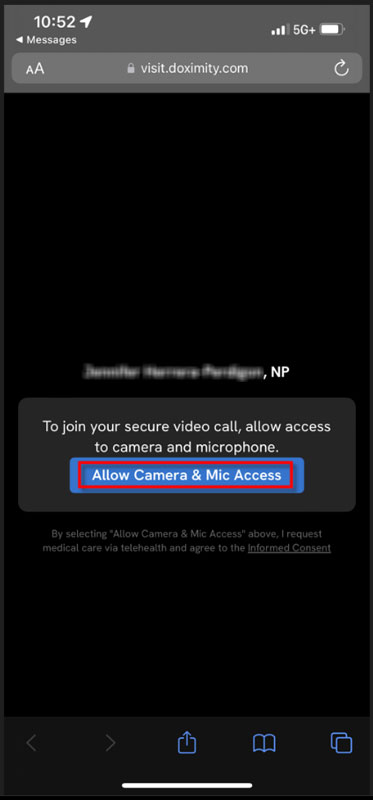
Once the patient selects the hyperlink that was sent, you will be asked to ‘Allow Camera & Mic Access’
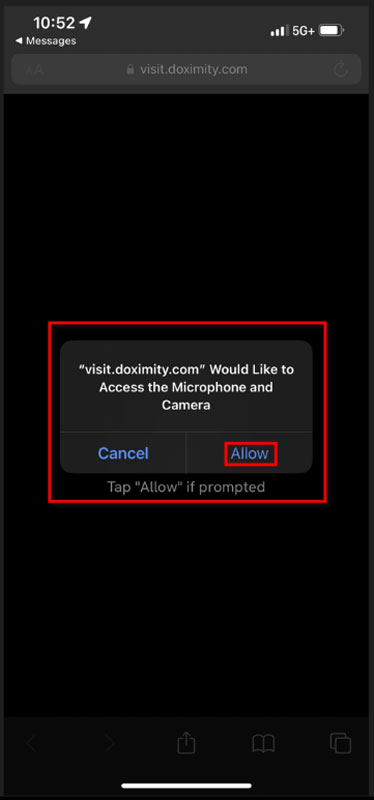
You will be asked again to verify your selection
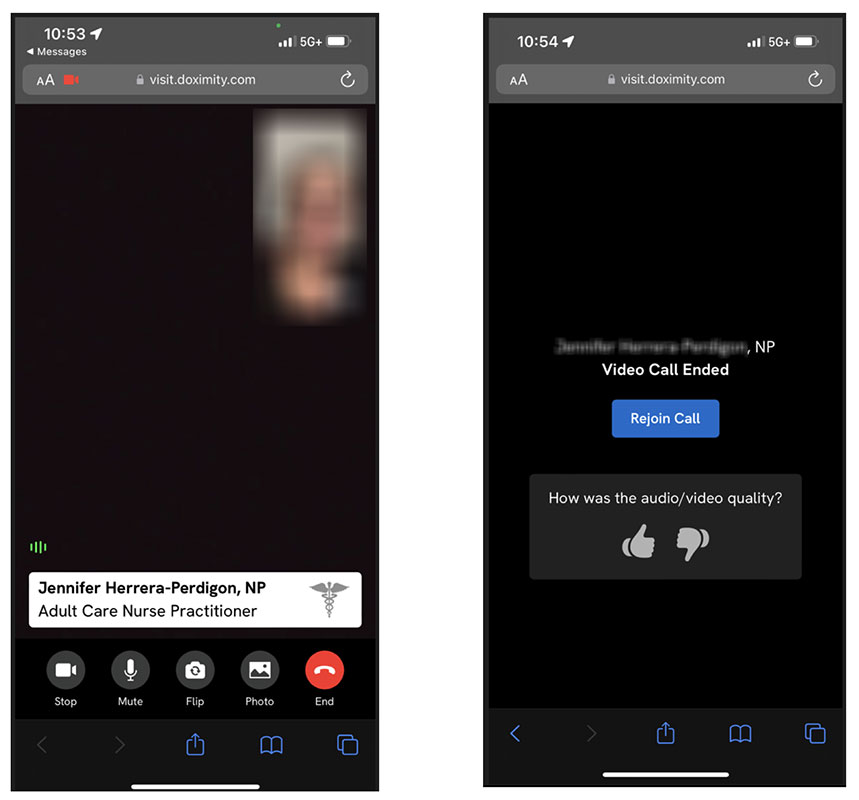
Once you allow, you will be connected with your clinician. You will be able to see then, as well as be seen by them. Once the visit is over, you will be allowed to rejoin if needed.
- How to be linked to child
** If you are the legal guardian or the non-custodial parent of the minor or if you have a durable power of attorney for healthcare with regard to the minor, then this request MUST be accompanied by a copy of legal paperwork verifying your authority to have access to the minorrsquo;s UHealth provider. An electronic version is available by clicking the link below.
Proxy Access- Child - Explanation after 12 (has to be relinked every year)
** If you are the legal guardian or if you have a durable power of attorney for healthcare with regard to the patient, then this request MUST be accompanied by a copy of legal paperwork verifying your authority to have access to the patient?
Adult Proxy From - Please contact us at 877-448-1773 to re-activate your account.
With proxy access, clinicians can give parents access to their children's MyChart accounts, give a husband or wife access to a spouse's MyChart account, or give caregivers access to the MyChart accounts of those for whom they care. The term "proxy" means someone who has access to a MyChart account that is not her own.
In UChart, a parent must be linked to a minor patient in order to conduct a telemedicine visit.
Please see below of additional information:
- Medications
- Allergies
- Health Issues
- Immunizations
Share everywhere allows users to Grant one-time, limited access to the health information you can see in MyUHealthChart, including:
The person accessing your record will also be able to write a clinical note to your care team.
To access this, please log in to MyUHealthChart.com, or your MyChart application, and select Share Everywhere from the main menu.
We are happy to provide you with a convenient, secure way to share your medical radiology images with your UHealth provider. UHealth now offers the option for you to upload your studies into our image sharing platform - Ambra.